

Calibration
How-to · Last verified against firmware v4.1.0b0 on 2026-05-10.
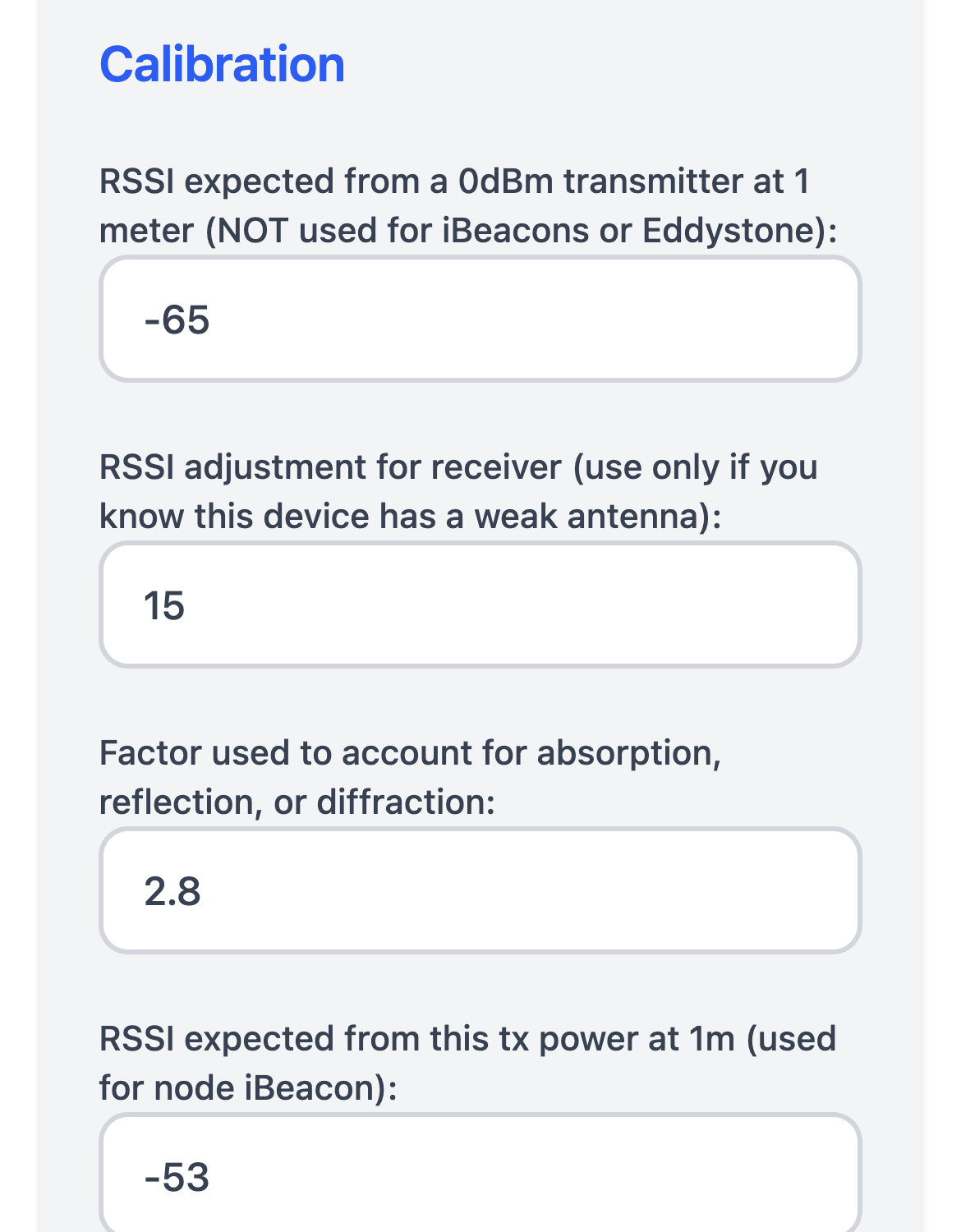
If distances feel wrong, nearest-node decisions flip, or your tracked devices read 3 m away when they’re sitting next to a node — this is the page. Start with the triage table, then run the procedure on the matching setting.
30-second triage
Section titled “30-second triage”| Symptom | Setting that usually fixes it |
|---|---|
| Same beacon at the same spot reads very different distances on different nodes | Rx Adj RSSI (per-node offset) |
| All nodes agree, but distances are wrong at the far end of the house | Absorption Factor (walls/attenuation) |
| Distance is wrong at 1 m — “I’m right next to it and it says 3 m” | RSSI@1m for that beacon type, or fix the beacon’s broadcast power |
| Distances jitter, occasionally jump 5–10 m | Antenna placement, metal enclosure, or 2.4 GHz interference — not a calibration setting |
| Floorplan position drifts away from where the device actually is | Companion problem, not firmware. See Floorplan drift is a different problem below. |
| Apple Watch / Apple device reads way further than reality | Different calibration path entirely — iBeacons broadcast their own rssi@1m, and resolved Apple identities use IRK enrollment. See the Apple guide. |
Source: canonical pin #2323 “Calibration — start here”, maintained by the community.
The procedure
Section titled “The procedure”You need: a beacon transmitting at exactly 0 dBm (a known-good iBeacon or Eddystone tag with calibrated tx power), a tape measure, and access to the Settings page of each node’s web UI.
- Pick one reference node in an open area, away from walls and metal. Leave its Rx Adj RSSI at
0. Every other node gets calibrated against this one. - Place the beacon exactly 1 m from the reference node. Watch the average RSSI for that beacon on the reference node’s Settings page. Record it.
- Enter that value as RSSI expected from a 0 dBm transmitter at 1 m on every node. This is the global reference, not per-node.
- For each other node, put the same beacon at the same distance and compare to the reference node’s reading. If it reads stronger (less negative), set a positive Rx Adj RSSI of the difference; if weaker, a negative one. The node subtracts it from every reading. Adjust until both nodes report approximately the same RSSI for the beacon.
- Move the beacon several meters through the kind of walls you actually have. Adjust Absorption Factor (typical range
2.5–3.5) until the reported distance matches reality. Beyond 1 m, higher absorption means a shorter reported distance for the same RSSI. - Verify at a second location. Don’t tune to one spot — it will overfit.
Same procedure works for a single-node setup, except you skip step 4.
Setting the values from MQTT
Section titled “Setting the values from MQTT”If you prefer MQTT to the web UI, every calibration setting accepts a …/set topic. Replace * with the room/node name or use * to broadcast to all.
espresense/rooms/livingroom/ref_rssi/set -65 # RSSI@1m (int, dB)espresense/rooms/livingroom/rx_adj_rssi/set -3 # per-node offset (int, dB)espresense/rooms/livingroom/absorption/set 2.8 # absorption factor (float, 1.0–5.0)espresense/rooms/livingroom/forget_ms/set 300000 # forget unseen devices after (ms)The settings are retained on the device and survive reboot. Values published unretained on espresense/rooms/+/<key> (no /set) are status only — don’t write there.
The settings, in detail
Section titled “The settings, in detail”RSSI expected from a 0 dBm transmitter at 1 m
Section titled “RSSI expected from a 0 dBm transmitter at 1 m”The reference point for devices that don’t broadcast their own rssi@1m. Set this once, globally — every node uses the same value.
- Used for: most wearables, generic BLE devices, Android tags, anything advertising without a calibrated power value.
- Not used for: iBeacons and Eddystone beacons. Those broadcast their own
rssi@1mand the node uses that. If a calibrated iBeacon reads wrong at 1 m, fix the beacon’s broadcast power, not this setting. - Firmware constant:
EDDYSTONE_ADD_1M = -41. Eddystone broadcasts its calibrated power at 0 m, not 1 m — the firmware subtracts 41 dB internally. If you’re hand-comparing Eddystone numbers, add 41. - MQTT key:
ref_rssi(yes, justref_rssi, notrx_ref_rssi).
Factor used to account for absorption, reflection, or diffraction
Section titled “Factor used to account for absorption, reflection, or diffraction”The path-loss exponent. Higher numbers assume more attenuation, so the same drop in signal means less distance: beyond 1 m, a higher value reports a shorter distance for the same RSSI. If far devices read too far away, raise it; if they read too close, lower it. Range is 1–5, typical is 2.5–3.5.
- Free air: ~2.0.
- Drywall, residential interior: 2.5–3.0.
- Brick, dense furniture, multi-room: 3.0–3.5.
- 1 m thick stone (yes, a real user case from #1817): higher; consider adding more nodes instead.
- MQTT key:
absorption.
RSSI adjustment for receiver
Section titled “RSSI adjustment for receiver”An offset (in dB) subtracted from every RSSI reading from this specific node. Different ESP32 boards, antennas, and even USB cables can shift readings by several dB; this normalizes them so trilateration is fair across mixed hardware.
- Reference node: leave at
0. - Stronger-reading node (RSSI is less negative than reference): set positive. A node reading -60 where the reference reads -65 needs
5. - Weaker-reading node: set negative. A node reading -70 there needs
-5. - ESP32-S3 nodes default to
20unless you set a value. - Because it’s a constant offset, it doesn’t change relative motion within a single room — but it keeps multi-room decisions consistent.
- MQTT key:
rx_adj_rssi.
Forget beacon if not seen for (in milliseconds)
Section titled “Forget beacon if not seen for (in milliseconds)”How long a MAC address stays in the internal tracking list after the last advertisement. Default: 300000 (5 minutes). Shorter values remove stale devices faster but cause re-add churn for devices that broadcast intermittently. MQTT key: forget_ms.
Failure modes (and where they came from)
Section titled “Failure modes (and where they came from)”These are the most-asked calibration problems in Discussions. When you hit one of them, you are not alone.
“I can walk across the entire house and the distance only goes from 1.0 to 2.5”
Section titled ““I can walk across the entire house and the distance only goes from 1.0 to 2.5””User @Zipties in #213. Cause: RSSI@1m was set far too pessimistic (too low / too negative) for the device. With a too-low RSSI@1m, every distance gets compressed — the math collapses.
Fix: redo step 2 of the procedure. Measure the actual average RSSI at 1 m for the device type you’re tracking. If you’re tracking an iPhone, calibrate using an iPhone, not a beacon — Apple devices have their own typical tx power that the firmware compensates for via APPLE_TX = 0, but the global RSSI@1m still has to be in the right ballpark.
“Mi7 band sometimes says NOT HOME when I’m in my office”
Section titled ““Mi7 band sometimes says NOT HOME when I’m in my office””User @scargill in #1687. Cause: small / low-power BLE wearables advertise infrequently and weakly. Cranking RSSI@1m down to “see further” is the wrong knob — it just makes other distances inaccurate.
Fix:
- Add a node closer to the office, don’t push existing nodes harder.
- Use Rx Adj RSSI to compensate if a specific node has a known-weak antenna (a negative value).
- Increase Forget beacon if not seen for so an unseen-but-recent device isn’t dropped between advertisements.
- Tune the “away” detection window in Home Assistant, not in firmware — that’s where the flap actually shows up.
“Distances seem fine but the wrong room flips on and off”
Section titled ““Distances seem fine but the wrong room flips on and off””User @plackettsj1 in #1817. This one fooled people because the per-axis coordinates were stable to centimeters and still the room flipped. Cause: Companion-side aggregation/room-boundary logic, not firmware calibration.
See Floorplan drift is a different problem below.
“Where does the original calibration writeup live?”
Section titled ““Where does the original calibration writeup live?””Most-upvoted Q&A is user @Erwinsmith101’s #353 and DT’s original writeup in #324. Both still match the current procedure on this page.
The easy path: let Companion auto-calibrate
Section titled “The easy path: let Companion auto-calibrate”If you’re running ESPresense-Companion with a floorplan, hand calibration is mostly optional. Companion sends optimization beacons between nodes, compares measured vs. expected distances against your floorplan, and adjusts Rx Adj RSSI and Absorption automatically.
Requirements:
- Node coordinates on the floorplan are correct (measure with a tape, don’t eyeball — even 50 cm matters).
- At least three nodes that can hear each other.
- Auto-optimization enabled in the Companion config.
Results show up on the Calibration page in the Companion UI, where you can also reset them across all nodes. Full details: Companion → Optimization.
Floorplan drift is a different problem
Section titled “Floorplan drift is a different problem”If your coordinates are wrong on the floorplan — not your distances — calibration isn’t the right knob. Check:
- Node coordinates on the map. Even a 50 cm error compounds across rooms.
- Number of nodes seeing the device. Aim for 5+ fixes for a stable solve.
- One outlier node dragging the solve. Hover the device in Companion to see per-node distance circles — the one circle that doesn’t intersect the others is the bad fix. Recalibrate or move that node.
- Z-axis / room-boundary logic. #1817 is the worked example.
Re-calibrate if any of these change
Section titled “Re-calibrate if any of these change”- Antenna (built-in → external, or vice versa).
- Enclosure (especially metal, but even some 3D-printed enclosures with conductive infill shift readings).
- USB cable to the node (long thin cables introduce noise).
- The room itself: new furniture, big appliance, water tank, mirror.
Still stuck?
Section titled “Still stuck?”Open a Q&A discussion with:
- Firmware version (Settings page → bottom).
- Board model and antenna type.
- The device(s) you’re tracking.
- Screenshots of the Settings page and a beacon’s distance reading at a known location.
Faster turnaround for back-and-forth: Discord.
Reference
Section titled “Reference”- Settings page → Calibration section
- Per-device firmware constants:
src/rssi.h - Companion auto-optimization: Companion → Optimization
- Canonical pin (maintained reference): #2323 “Calibration — start here”